





Driving Controls
- WASD or arrow = drive
- Space bar = handbrake
- C = change vehicle camera
- Enter = reset vehicles
- R = repair vehicles
Terraform Controls
- WASD = move Camera
- Left Mouse Button (hold) + mouse axis = rotate camera
- Left Mouse Button (hold) = drag terraformer shape
- 1 to 5 Key = modify terrain
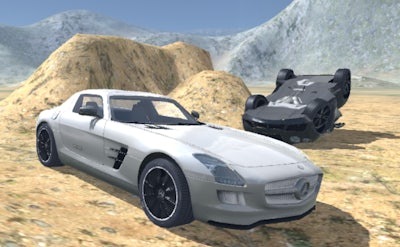
Derby Crash 2


Play Derby Crash 2 Online Free
Instructions
Driving Controls
- WASD or arrow = drive
- Space bar = handbrake
- C = change vehicle camera
- Enter = reset vehicles
- R = repair vehicles
Terraform Controls
- WASD = move Camera
- Left Mouse Button (hold) + mouse axis = rotate camera
- Left Mouse Button (hold) = drag terraformer shape
- 1 to 5 Key = modify terrain
Derby Crash 2: The Ultimate Destruction Derby Experience
Derby Crash 2 is the perfect game for fans of high-octane action and 3D car driving simulations. If you enjoyed the original Derby Crash, you'll love this sequel, which offers a wide range of new destruction derby cars and monster trucks to wreak havoc in an open world. With its stunning graphics and realistic physics engine, Derby Crash 2 provides an immersive gaming experience like no other.
So, how do you play this adrenaline-fueled game? It's simple: use the WASD or arrow keys to drive, the space bar to activate your handbrake, and the C key to change your vehicle's camera view. To reset your vehicles, just press the Enter key, and to repair them, use the R key. For terraforming, use the WASD keys to move your camera, hold the Left Mouse Button and move your mouse axis to rotate the camera, and hold the Left Mouse Button to drag the terraformer shape. You can also modify the terrain using the 1 to 5 keys. Here are the driving and terraforming controls in a nutshell:
- Driving Controls:
- WASD or arrow keys: drive
- Space bar: handbrake
- C key: change vehicle camera
- Enter key: reset vehicles
- R key: repair vehicles
- Terraform Controls:
- WASD keys: move camera
- Left Mouse Button (hold) + mouse axis: rotate camera
- Left Mouse Button (hold): drag terraformer shape
- 1 to 5 keys: modify terrain
As you progress through the game, you'll need to develop a solid strategy to destroy your opponents and emerge victorious. This is where the game's simulation aspect comes into play. You'll need to use your driving skills and knowledge of the track to outmaneuver your opponents and crash them into buildings or other obstacles. You can also use your tank to blast your way to the top. With its addictive gameplay and challenging levels, Derby Crash 2 is sure to keep you hooked for hours on end. At GamaVerse, we're committed to providing you with the best gaming experience possible, which is why we're proud to offer Derby Crash 2 as part of our lineup.
Take Your Gaming Experience to the Next Level with GamaVerse
So, what are you waiting for? Join the stunt driving action and play Derby Crash 2 today! With its stunning graphics, realistic physics engine, and addictive gameplay, this game is sure to provide you with hours of entertainment. And, as a valued member of the Derby Crash 2 community, you'll be able to access exclusive content and updates from GamaVerse. Don't miss out on the fun – start playing Derby Crash 2 now and experience the thrill of car driving like never before!
