




GamaVerse
Click to play
x
Controls
Keyboard W Up - throttle S Down - brake reverse A D - steer Space E - nitro Shift F - handbrake drift Esc P - pause Mouse menu upgrade cards drag to rotate the car in the garage Touch left side - floating stick DRIFT and NITRO b
Zombie Drift: Steel Rage

Zombie Drift: Steel Rage

Zombie Drift: Steel Rage
Click to play
This game is not available on mobile.
rotate phone

Play Zombie Drift: Steel Rage Online Free

Instructions

Keyboard W Up - throttle S Down - brake reverse A D - steer Space E - nitro Shift F - handbrake drift Esc P - pause Mouse menu upgrade cards drag to rotate the car in the garage Touch left side - floating stick DRIFT and NITRO b

Survive the Apocalypse in Zombie Drift: Steel Rage

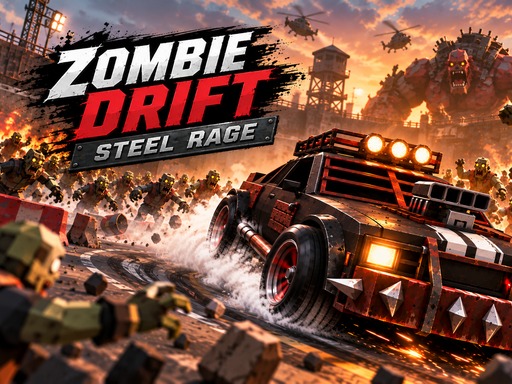
The world ended, but the engine is still running. You command an armored battle car in a ruined city arena where every corner brings a new horde. This 3D action experience combines high-speed racing with brutal survival. You don't just drive; you use physics and momentum to crush the undead. Sharp drifts build your nitro meter, allowing you to smash through mutant giants with spiked bumpers. A perfect slide increases your ramming damage by up to 2.5x. Mow down walkers, blow up explosive barrels, and collect scrap gears to keep your machine alive. Find more intense driving challenges at GamaVerse.

Master the Controls of Zombie Drift: Steel Rage

Control your car with precision to navigate through tight streets and avoid massive titan bosses. Use these inputs to dominate the arena:

  • Keyboard W Up - throttle
  • S Down - brake reverse
  • A D - steer
  • Space E - nitro
  • Shift F - handbrake drift
  • Esc P - pause
  • Mouse menu upgrade cards drag to rotate the car in the garage
  • Touch left side - floating stick
  • DRIFT and NITRO buttons
Zombie Drift: Steel Rage Gameplay

Winning Tactics for Zombie Drift: Steel Rage and GamaVerse

Survival requires more than just speed. You must manage your upgrades and vehicle selection carefully. The campaign features 100 levels across 10 chapters, featuring 20 massive titan bosses. Start with basic cars and work your way up to the Iron Fang, the Dune Reaper buggy, or the heavy War Titan. Between waves, pick weapon modules like miniguns, buzzsaws, flamethrowers, or rocket mortars to suit your playstyle. If you prefer endless action, jump into the survival mode to see how long you can last against growing zombie waves. Prioritize upgrading your armor and turbo to handle the increasing intensity of the 3D environment.

Grab your keys and hit the asphalt. Enter the arena and prove your skills in Zombie Drift: Steel Rage now.

Customise Consent Preferences Close

We use cookies to help you navigate efficiently and perform certain functions. You will find detailed information about all cookies under each consent category below.

The cookies that are categorised as "Necessary" are stored on your browser as they are essential for enabling the basic functionalities of the site.

Always Active

Necessary cookies are required to enable the basic features of this site, such as providing secure log-in or adjusting your consent preferences. These cookies do not store any personally identifiable data.

Functional cookies help perform certain functionalities like sharing the content of the website on social media platforms, collecting feedback, and other third-party features.

Analytical cookies are used to understand how visitors interact with the website. These cookies help provide information on metrics such as the number of visitors, bounce rate, traffic source, etc.

Advertisement cookies are used to provide visitors with customised advertisements based on the pages you visited previously and to analyse the effectiveness of the ad campaigns.

We also use third-party cookies that help us analyse how you use this website, store your preferences, and provide the content and advertisements that are relevant to you. These cookies will only be stored in your browser with your prior consent.

You can choose to enable or disable some or all of these cookies but disabling some of them may affect your browsing experience.